A Basic Programming Concept
Welcome to this intro lesson on programming using Python. If this is your first time programming or if you’re new to programming then this lesson will be a great start to your programming introduction.
In programming, one of the key programming principles is called DRY which stands for Don’t Repeat Yourself. How many of you have done things over and over again and thought to yourself, “Wouldn’t be nice to have this done for your automatically?” Well, that’s the power of programming. You do the work once and then the program or application does the work for you, either by a button, a process or something. We’ll do a simple program that will demonstrate the DRY principle.
Program Outcome
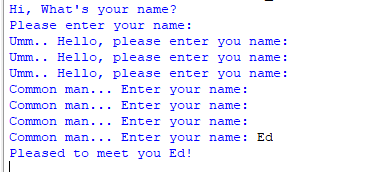
The final program that we’ll create as in input Python program where the program asks you to enter your name. If you don’t answer then it begins to have an attitude.
Lesson Outline
This lesson will be broken down into 3 short lesson videos and one optional pre-lesson video.
- Python Tutorial Part 1 – Basic Python Script
- Python Tutorial Part 2 – Conditional Statements
- Python Tutorial Part 3 – Loops
- Optional – Installing Python, variables and datatypes: Pre-Lesson
- Resources: Programs File Downloads and more…
Lesson Modules
Python Tutorial Part 1 – Basic Python Script
In this lesson, we’ll being with the famous, “Hello, World” program languages start with when learning a new language. However, we’re going to modify the output to something different. This demonstration will cover a basic python script that outputs text to the screen.
IMPORTANT: If you’re completely new and this is your first time coding, I highly recommend you going through the Optional – Installing Python, variables and datatypes: Pre-Lesson.
Enjoy!
Python Tutorial Part 2 – Conditional Statements
In this lesson, we’re going to introduce the concept of functions as well as conditional statements like if, elif and else. Enjoy!
Python Tutorial Part 3 – Loops
In this lesson we go all out and mix all of the things we learned in the previous lessons. In addition, we add into the mix, loops, counters, and a Python program with Sass. Enjoy!
Optional: Pre-Lesson
In this lesson we’ll cover the basics of Python programming. Well go to the Python.org website and download the latest version of Python. Then we’ll briefly cover data types and variables to lay some Python programming basics. Enjoy!
Conclusion
Well, congratulations on completing this Python Intro course. I encourage you to keep going and delve deeper into your programming journey. If you have any questions, comments, and/or suggestions, I encourage you to reach out to us at our Contact page.
Thanks for going through this course. More to come and we look forward to seeing the next generation of computer programmers that will change the world.
Until next time.
Aloha,
Ed Fong
Resources
As with everything, you will always learn new things even if you’ve taken a class on a topic or covered them in some form or another. The same goes for programming. Your learning goes as far as you are willing to go and it doesn’t stop at one class. I encourage you to dig deeper and further review the links below. Until next time, Aloha and happy coding.
Download Files:
Program class files download: DOWNOAD
Links:
Python Site
Main site: https://www.python.org/
Download: https://www.python.org/downloads/
Getting Started: https://www.python.org/about/gettingstarted/
Beginners Guide: https://wiki.python.org/moin/BeginnersGuide
W3Schools.com
Python Variables: https://www.w3schools.com/python/python_variables.asp
Python Data Types: https://www.w3schools.com/python/python_datatypes.asp
Sequence Data Types:
Lists: https://www.w3schools.com/python/python_lists.asp
Tuples: https://www.w3schools.com/python/python_tuples.asp
Sets: https://www.w3schools.com/python/python_sets.asp
Dictionaries: https://www.w3schools.com/python/python_dictionaries.asp